
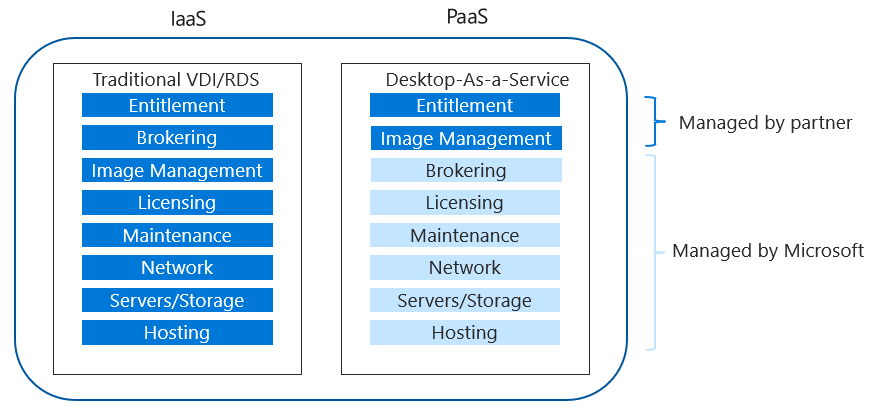
Let’s talk a little Windows Virtual Desktop (WVD) or Desktop as a Service (DaaS).
It’s a hot topic right now with many of our customers requiring some sort of remote work solution for their employees.
WVD on Azure is Microsoft’s fully managed desktop virtualization solution in the cloud.
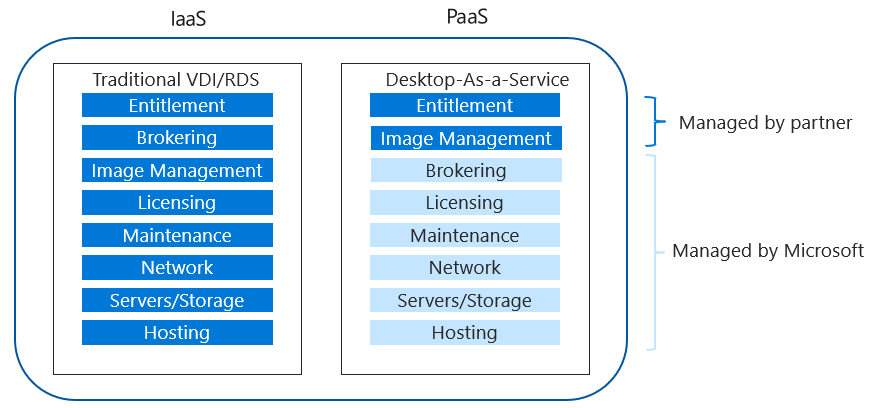
(Picture credit to Microsoft)
As noted in the picture, it’s a PaaS offering that allows our customers to securely access their remote desktops and apps from anywhere, on their favorite device.
Windows 10 and Office 365 apps perform as if it is on a locally hosted desktop.
I want to highlight a few security features of WVD on Azure that you may not have previously thought about:
1) Yes, your user sessions are isolated, this is a common question we receive
2) As there are no inbound ports to VM’s, your attack surface is reduced vs. traditional VDI
3) You have the ability to enhance your security through role-based access controlsWhat are your thoughts on WVD on Azure?