Active Directory Snapshot with NTDSUTIL

When making changes to Active Directory, like Schema updates, it is recommended to make a backup of AD. It is also recommended to perform these changes on an offline Domain Controller, perform your tests, and the only then replicate the changes to the remaining DCs. The topic of this article is about backing up AD.

NTDSutil provides a mechanism to perform backups on your domain controllers.

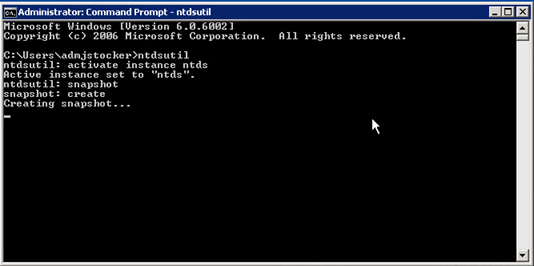
  1. Open an elevated command prompt and run NTDSutil.
  2. Run activate instance ntds to set the active instance to “ntds“.
  3. Type snapshot.
  4. Then Create.

For more details on NTDSutil: http://technet.microsoft.com/en-us/library/cc753343(v=WS.10).aspx


Full Azure AD P1 is coming to M365 Premium

Full Azure AD P1 is coming to M365 Premium

Full Azure AD P1 is coming to M365 Premium ⚡ For our customers under 300 employees, Azure Active Directory Plan 1 is coming to M365 Business...

Read More
Recent Microsoft Licensing Changes – Q4 2022

Recent Microsoft Licensing Changes – Q4 2022

Microsoft Has Recently Announced Some Major Changes Microsoft licensing is complex and it’s often difficult to remain up to date on the constant...

Read More
Here's the Scoop on the Recent Microsoft Updates

Here's the Scoop on the Recent Microsoft Updates

Microsoft products and the associated licensing t's and c's are constantly changing, and CloudServus wants to keep you up to date on changes that may...

Read More